
The Instagram Friends tab shows Reels your friends liked, commented on, and posted, all in one feed. Here's how it works, how to get it, and how to control what appears.
.avif)
Automate Comments and DMs in 5 Minutes
Someone comments on your IG post. They get a DM instantly. You do nothing.

Trusted by 10K+ creators and SMBs


TL;DR
TL;DR
Instagram has been steadily shifting toward more social, collaborative discovery. One of its newest additions—the Friends tab in Reels—puts your close social circle front and center by showing you public content your friends have liked, commented on, or created, plus recommendations from Blends you’ve started together.
It’s a clear move to make Reels not just a “For You” experience, but also a “From Them” one—highlighting what the people you care about most are enjoying.
The Friends tab is a new section in the Reels interface where you can:
Think of it as your friends’ activity feed for Reels, designed to spark conversation and engagement.
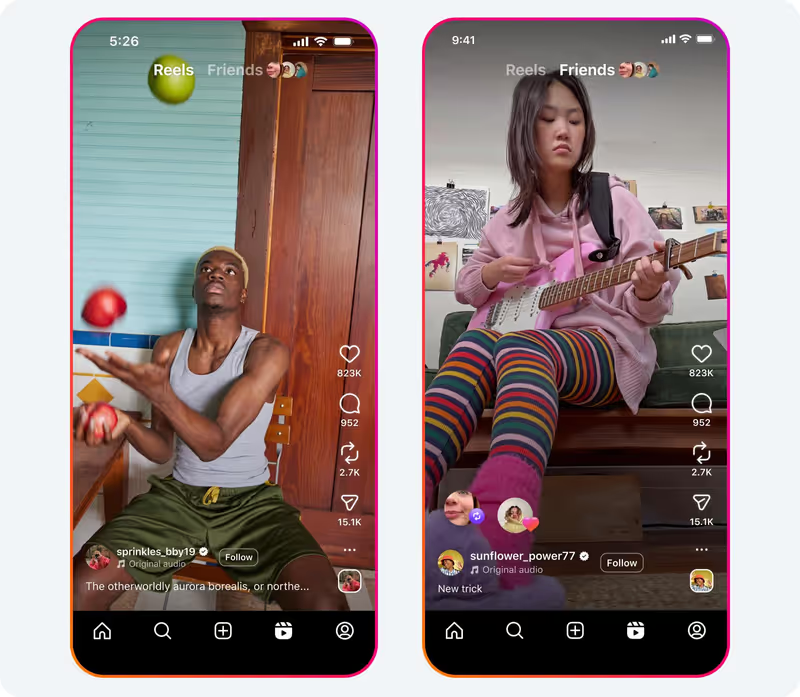
If you don’t see the Friends tab yet:
While you can’t remove the tab entirely, you can control what appears in it:
Some users refer to it as the With Friends tab—same feature, different name in early tests.
To reduce its visibility:
Instagram says the Friends tab aims to:
It’s part of a broader trend across social apps: blending “for you” content with “from people you know.”
The Friends Tab changes how your Reels get discovered, but discovery alone doesn't convert. When your Reel appears in someone's Friends Tab because their friend liked or commented on it, you're reaching a warm audience that already has social proof. These viewers are more likely to comment, DM, or follow than cold algorithmic traffic.
The creators getting the most value from Friends Tab discovery are combining it with comment-to-DM automation so every interaction the Friends Tab generates is automatically captured. Here's the workflow:
The Friends Tab creates a network-driven traffic spike. Automation makes sure none of it goes to waste. Learn exactly how to set this up in our guide to comment-to-DM aut
Friends Tab discovery is most powerful when you have a lead capture mechanism already in place before the reach spike happens. Three ways to do this:
Choose a keyword relevant to your Reel ("link", "info", "yes") and set up an automation that sends a DM to anyone who comments it. When your Reel gets shared through the Friends Tab and drives a comment spike, every keyword comment is automatically converted into a DM conversation.

Every time someone follows you after interacting with your content through the Friends Tab, you can trigger a welcome DM sequence automatically. Inrō lets you send that follower a message thanking them for following, sharing your best content, or making an offer while they are still warm from that first interaction.

The content most likely to appear in Friends Tabs is content people actively engage with, not just watch. Reels that ask a question, include a keyword CTA ("comment 'link' for the full guide"), or trigger a strong emotional reaction get liked and commented on more, which means they spread further through the Friends network. Read our full guide on how to generate leads from Instagram Reels.
Possible reasons:
The Friends tab is Instagram’s way of bringing trusted recommendations into the short-form video space. For casual users, it’s a social discovery tool; for creators, it’s a new distribution channel fueled by real relationships. Like any social feature, the key is knowing how to use it—and how to control it—so your feed feels inspiring, not overwhelming.
If you use Instagram to connect with customers, fans, or your community, you’re leaving opportunities on the table. That’s where Inrō comes in — it’s the all-in-one DM automation platform built for Instagram. Automatically reply to comments, Story mentions, and DMs in real time, send the right link when interest is highest, and grow your contact list without lifting a finger. Whether you sell products, promote events, or just want deeper engagement, Inrō makes sure no warm lead slips away.
Inrō turns every comment into an automatic DM conversation, no manual replies needed.


A Reels feed showing public content your friends have engaged with or created, plus recommendations from Blends.
Update your app, go to Reels, and look for “Friends” at the top.
Tap Reels → Friends at the top → browse your friends’ activity.
It aggregates friends’ public Reels likes/comments/posts into one feed.
You can’t remove it entirely, but you can hide your activity or mute others from appearing.
Mute specific people or opt out of Blends.
Likely due to regional rollout or app version; update or wait for feature enablement.
No—Close Friends is for Stories; Friends tab is for Reels.
The most effective approach is to create Reels with high engagement triggers, questions, keyword CTAs, or strong reactions, so friends actively like and comment, spreading your content through their networks' Friends Tabs. Pair this with a comment-to-DM automation so every new comment from Friends Tab discovery is automatically captured as a lead.
Yes, indirectly. When your Reel appears in someone's Friends Tab because their friend engaged with it, that viewer already has social proof. They're warmer than algorithmic traffic and more likely to comment or DM. Setting up keyword-triggered DM automations before you post means every comment the Friends Tab drives is automatically converted into a DM conversation.
Content that drives active engagement, comments, likes, and shares — rather than passive views. Reels with a clear question, a keyword CTA ("comment 'yes' if you want this"), or a strong opinion tend to spread further through the Friends network because they trigger friend-to-friend interactions.
Activity in the Friends tab includes public Reels your friends have liked, commented on, or reposted, as well as Reels your friends have posted themselves. It does not include private activity or content from private accounts. If you want to control what activity of yours appears in other people's Friends tabs, go to Settings, then Privacy, then Reels, and adjust the "Hide activity from Friends tab" option.
The most common reasons are: your app is not updated to the latest version, the feature has not rolled out to your region yet, or you have not interacted with friends' public Reels recently enough for the feed to populate. Update Instagram via the App Store or Google Play, then go to Reels and check for the Friends tab at the top. If it is still missing, the rollout may not have reached your account yet, Instagram is enabling it gradually across regions.
Join automations strategies and Instagram Insights weekly
By entering your email address above and clicking Subcribe, you consent to receive marketing communications (such as newsletters, blog posts, event invitations and new product updates), and targeted advertising from Inrō from time to time. You can unsubscribe from our marketing emails at anytime by clinking on the "Unsubscribe" link at the bottom of our emails. For more information about how we process personal information and what right you have on this respect, please see our Privacy Policy.
Attract more leads, target them with DM marketing, and automate your interactions on Instagram!

.png)
.png)
.png)